Perkenalan
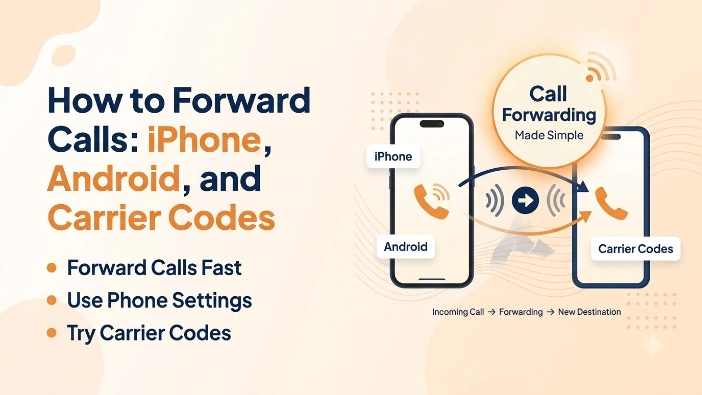
Penerusan panggilan mengalihkan panggilan masuk dari satu nomor ke nomor lainnya secara otomatis, baik itu mengirimkan saluran kerja ke telepon seluler, nomor pribadi ke pesan suara, atau panggilan seluruh bisnis ke staf yang siap dihubungi setelah jam kerja. Langkah pastinya bergantung pada apakah Anda menggunakan iPhone, Android, atau kode operator secara langsung, dan Verizon khususnya menanganinya secara berbeda dari AT&T dan T-Mobile. Siapa pun yang mengetik cara meneruskan panggilan ke bilah pencarian biasanya hanya menginginkan langkah yang tepat untuk ponsel dan operator tertentu tanpa harus terlebih dahulu membaca instruksi untuk yang salah.
Panduan ini mencakup langkah-langkah yang tepat untuk iPhone dan Android, kode panggil universal yang berfungsi ketika menu pengaturan ponsel tidak memiliki opsi penerusan panggilan, perbedaan spesifik operator, dan cara mematikan penerusan panggilan setelah Anda tidak lagi membutuhkannya.
Sekilas tentang penerusan panggilan
- iPhone: Pengaturan → Telepon → Penerusan Panggilan (tidak tersedia di Verizon)
- Android: Aplikasi telepon → Pengaturan → Penerusan Panggilan
- Kode panggil Verizon / US Cellular: *72 untuk menghidupkan, *73 untuk mematikan
- Kode dial AT&T / T-Mobile: *21* + nomor + # untuk menghidupkan, #21# untuk mematikan
- Reset universal: ##002# membatalkan semua penerusan pada sebagian besar operator di seluruh dunia
- Kode kondisional: *61* (tidak ada jawaban), *67* (sibuk), *62* (tidak dapat dijangkau)
- Alternatif bisnis: dasbor cloud menggantikan kode panggilan dengan perutean sekali klik
Cara Meneruskan Panggilan di iPhone
Di sebagian besar operator, penerusan panggilan iPhone adalah tombol bawaan yang tidak memerlukan pemanggilan kode khusus apa pun.
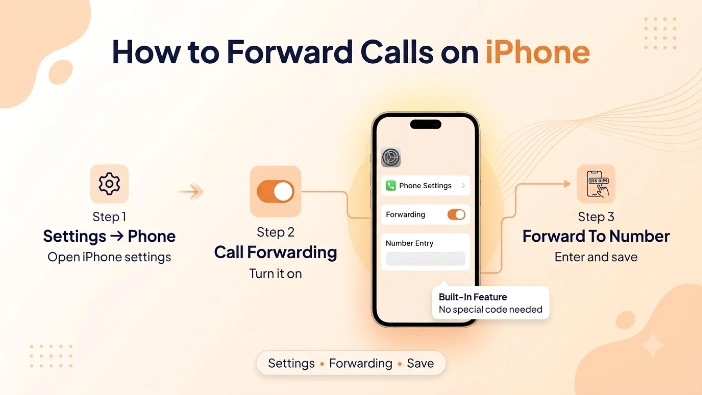
- Buka Pengaturan, lalu gulir ke bawah dan ketuk Telepon
- Ketuk Penerusan Panggilan, lalu aktifkan
- Masukkan nomor tujuan penerusan panggilan, lalu ketuk tombol kembali untuk menyimpan
Mengapa iPhone Verizon Tidak Menampilkan Opsi Ini
IPhone Verizon tidak menampilkan tombol Penerusan Panggilan di Pengaturan sama sekali, karena jaringan Verizon menangani penerusan melalui kode panggil alih-alih pengaturan GSM standar yang dibuat oleh Apple. Siapa pun di Verizon perlu menggunakan metode kode operator yang dijelaskan lebih lanjut daripada mencari pengaturan yang tidak ada.
Cara Meneruskan Panggilan di Android
Pengaturan penerusan panggilan Android ada di dalam aplikasi Telepon di setiap perangkat pabrikan besar, meskipun jalur menu pastinya sedikit berbeda antara Samsung, Google Pixel, dan merek lain.
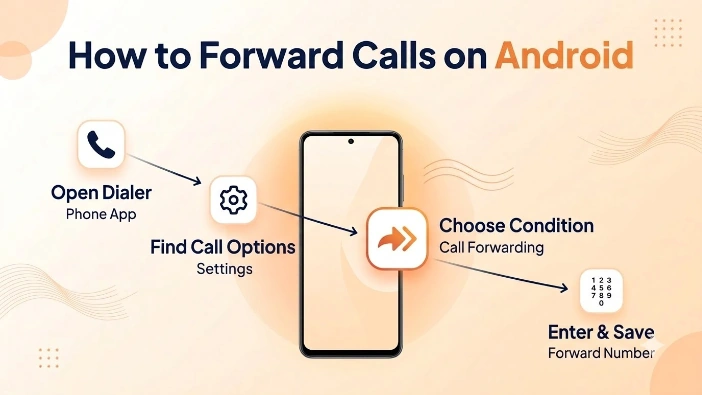
- Buka aplikasi Telepon dan ketuk menu tiga titik di sudut
- Ketuk Pengaturan, lalu cari Panggilan, Layanan Tambahan, atau Akun Panggilan tergantung pada teleponnya
- Ketuk Pengalihan Panggilan, pilih kondisi — selalu, saat sibuk, saat tidak dijawab, atau saat tidak dapat dijangkau — dan masukkan nomor penerusan
Jika menu tersebut tidak muncul di ponsel Android tertentu, kode panggil operator yang sama yang digunakan sebagai cadangan iPhone Verizon juga berfungsi di sini, karena kode tersebut beroperasi di tingkat jaringan dan bukan melalui perangkat lunak ponsel itu sendiri.
Kode Dial Operator untuk Penerusan Panggilan
Jika pengaturan internal ponsel tidak menawarkan penerusan panggilan, atau tidak berfungsi dengan benar pada operator tertentu, menekan kode akan langsung mengaktifkan atau menonaktifkannya di tingkat jaringan.
- Verizon dan US Cellular — tekan *72 diikuti dengan 10 digit nomor dan tekan panggil untuk mengaktifkan penerusan; tekan *73 untuk mematikannya
- AT&T dan T-Mobile — tekan *21*, nomor penerusan, lalu # untuk menyalakannya; tekan #21# untuk mematikannya
- Kode GSM universal — panggilan ##002# membatalkan semua penerusan panggilan aktif pada sebagian besar operator di seluruh dunia, berguna sebagai penyetelan ulang jika penerusan macet.
Penerusan bersyarat, yang hanya mengalihkan panggilan dalam keadaan tertentu dan bukan setiap panggilan, menggunakan kumpulan kode standarnya sendiri pada operator GSM: *61* untuk penerusan tidak ada jawaban, *67* untuk penerusan sinyal sibuk, dan *62* untuk saat telepon tidak dapat dijangkau, masing-masing diikuti dengan nomor dan #.
Perbedaan tersebut sangat penting bagi siapa pun yang ingin ponselnya berdering secara normal hampir sepanjang waktu, namun kembali ke nomor lain hanya ketika panggilan tidak terjawab atau telepon mati, daripada mengalihkan setiap panggilan tanpa syarat seperti yang dilakukan *72 atau *21*.
Mematikan Penerusan Panggilan
Lupa menonaktifkan penerusan adalah salah satu cara paling umum seseorang melewatkan panggilan tanpa menyadari alasannya, karena ponsel tidak menampilkan pemberitahuan panggilan tidak terjawab ketika semuanya dialihkan secara diam-diam ke tempat lain.
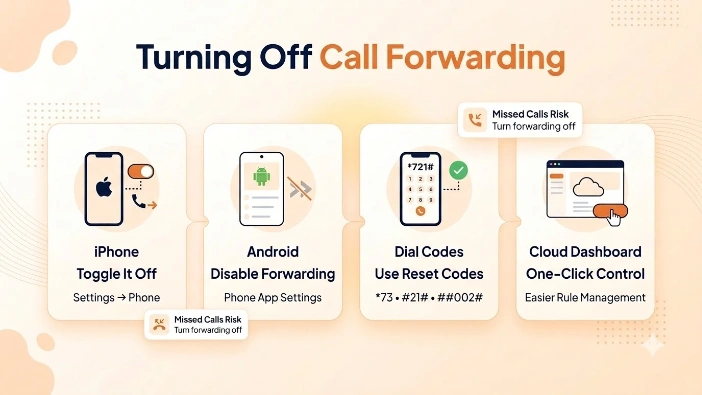
- Di iPhone, kembali ke Pengaturan, lalu Telepon, lalu Penerusan Panggilan, dan matikan
- Di Android, kembali ke menu penerusan panggilan yang sama yang digunakan untuk mengaktifkannya dan pilih opsi untuk menonaktifkannya
- Dengan kode panggil, gunakan *73 di Verizon dan US Cellular, #21# di AT&T dan T-Mobile, atau ##002# sebagai reset universal di sebagian besar operator lain
A nomor bisnis khusus menghindari seluruh kategori kesalahan ini, karena aturan penerusan ada di dasbor, bukan di kode panggil, tidak ada yang ingat menggunakannya enam bulan kemudian, dan mematikan aturan hanya membutuhkan satu klik alih-alih mencari urutan penonaktifan yang tepat untuk operator tertentu.
Kesalahan Umum Penerusan Panggilan
Sejumlah kesalahan yang dapat dihindari menyebabkan sebagian besar rasa frustrasi yang dialami orang-orang dalam penerusan panggilan, dan hampir semuanya disebabkan oleh lupa bahwa fitur tersebut aktif daripada kodenya sendiri yang gagal.
Meneruskan panggilan ke nomor yang sering sibuk atau tidak dapat dijangkau, seperti ponsel lain yang sering mati atau kehilangan sinyal, membuat penelepon langsung menemui jalan buntu alih-alih menghubungi siapa pun sama sekali, karena sebagian besar pengaturan penerusan bersyarat tidak secara otomatis kembali ke nomor kedua. Penerusan internasional adalah kejutan umum lainnya: meneruskan nomor AS ke tujuan internasional dapat menimbulkan biaya per menit pada jalur penerusan itu sendiri, biaya yang tidak akan muncul hingga tagihan tiba, karena orang yang menelepon tidak membayar apa pun tambahan sementara pihak penerusan menanggung biayanya.
Mengandalkan memori saja untuk melacak aturan penerusan mana yang aktif, terutama dengan beberapa kode kondisional yang berlapis-lapis, memudahkan Anda kehilangan jejak ke mana panggilan sebenarnya menuju. Dan aturan yang berlaku setelah ponsel mendapat SIM baru atau nomor di-porting ke operator lain dapat terus mengalihkan panggilan secara diam-diam ke tujuan lama selama berminggu-minggu sebelum ada yang menyadari kesenjangannya.
Penerusan Panggilan di Telepon Rumah dan Telepon Kantor
Telepon rumah tradisional dan telepon kantor menangani penerusan sedikit berbeda dari telepon seluler, meskipun kode panggil yang mendasarinya seringkali hampir sama.
Sebagian besar penyedia telepon rumah perumahan mendukung kode aktivasi dan penonaktifan *72/*73 yang sama dengan yang digunakan pada saluran seluler Verizon dan US Cellular, karena keduanya menelusuri kembali ke fitur perusahaan telepon standar yang sama. Sistem telepon kantor menambahkan lapisan lain sepenuhnya: bisnis yang menjalankan PBX atau sistem telepon yang dihosting biasanya mengelola penerusan melalui portal admin daripada kode panggil pada masing-masing handset, sehingga manajer kantor dapat mengalihkan panggilan seluruh departemen sekaligus alih-alih mengonfigurasi setiap telepon meja secara terpisah. Kontrol terpusat tersebut adalah salah satu perbedaan paling jelas antara pengaturan penerusan dasar yang dibuat untuk satu jalur dan sistem yang sebenarnya dirancang untuk mengarahkan panggilan ke seluruh tim.
Perbedaan tersebut terlihat paling jelas saat terjadi perpindahan kantor atau pergantian staf: memperbarui selusin telepon meja satu per satu untuk meneruskan ke nomor sementara membutuhkan waktu jauh lebih lama dibandingkan mengubah satu aturan perutean di dasbor admin yang berlaku untuk seluruh departemen sekaligus.
Penerusan Panggilan vs. Perutean Sistem Telepon Cloud
Penerusan panggilan berbasis operator berfungsi dengan baik untuk pengalihan sederhana dan satu kali, namun memiliki batasan nyata: sebagian besar operator hanya mendukung penerusan ke satu nomor, tidak menawarkan penjadwalan, dan tidak memberikan catatan tentang apa yang terjadi pada panggilan yang diteruskan.
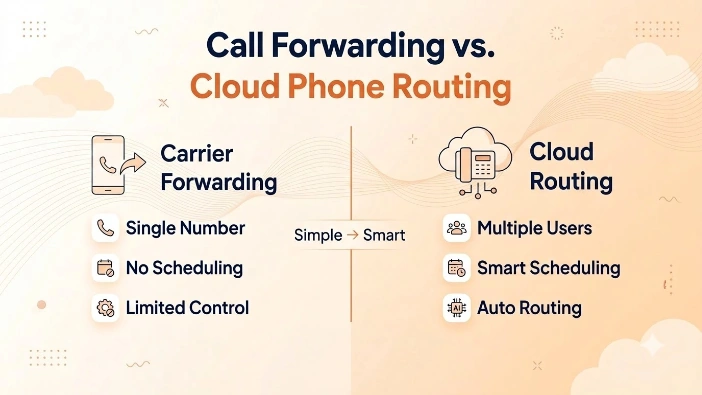
Platform telepon cloud membangun perutean langsung ke nomor itu sendiri, memungkinkan panggilan menelepon beberapa staf sekaligus, mengikuti jadwal, atau kembali ke pesan suara atau resepsionis AI secara otomatis, jenis pengaturan yang dibahas dalam panduan ini penerusan panggilan untuk tim yang sedang berkembang.
Dari Mana Kode Dial Ini Berasal
Spesifikasi formal di balik kode dial ini adalah standar layanan tambahan penerusan panggilan GSM (3GPP TS 22.082), yang menjadi dasar hampir setiap kode operator AS.
Kesimpulan
Penerusan panggilan hanya memerlukan beberapa ketukan di iPhone dan Android saat pengaturan bawaan ponsel tersedia, dan kode panggil singkat jika tidak tersedia, terutama untuk pengguna iPhone Verizon yang memerlukan *72 alih-alih tombol Pengaturan. Baik itu meneruskan nomor pribadi ke telepon kantor atau mengatur penerusan bersyarat untuk panggilan tidak terjawab, metode yang tepat bergantung pada kombinasi telepon dan operator yang Anda gunakan. Siapa pun yang menanyakan cara meneruskan panggilan kini memiliki langkah-langkah untuk setiap jalur utama, ditambah cara mematikannya kembali ketika tidak lagi diperlukan.
Bisnis yang memerlukan lebih dari satu nomor penerusan, seperti menelepon seluruh tim atau merutekan panggilan berdasarkan waktu, akan melampaui penerusan berbasis operator dengan cepat. Penyedia telepon berbasis cloud membangun fleksibilitas tersebut sejak awal, dengan perutean panggilan, resepsionis AI, dan analisis panggilan lengkap di setiap saluran. Siapkan nomor Letsdial hari ini dan berhenti mengandalkan kode panggil untuk mengatur tujuan panggilan Anda.
Pertanyaan yang Sering Diajukan
Ditulis oleh Arya Khan · 12 Agustus 2026
Balas ke penulis