
مقدمة
المكالمات التي تصل بهدوء على الهاتف الخطأ لا تكون مقصودة على الإطلاق. معظم الأشخاص الذين يبحثون عن كيفية إيقاف تشغيل إعادة توجيه المكالمات لم يقوموا بإعدادها عن قصد - فقد قامت مكالمة دعم شركة الاتصالات، أو جهاز جاهز للاستخدام، أو إعداد مكالمة جماعية منسية بقلب المفتاح في مكان ما ولم يتم إعادته أبدًا. إذا كان هاتفك يرن مرة واحدة ثم يصمت، أو قال المتصلون إنهم يصلون إلى بريدك الصوتي عبر خط مختلف تمامًا، فعادةً ما تكون إعادة التوجيه هي السبب.
والخبر السار هو أنه يمكنك تعطيل إعادة توجيه المكالمات في أقل من دقيقتين بمجرد معرفة مكان الإعداد الفعلي، وهو موجود في مكان مختلف اعتمادًا على ما إذا كنت تستخدم iPhone أو هاتف Android أو خطًا أرضيًا أو خط أعمال VoIP من خلال مزود مثل LetsDial. يستعرض هذا الدليل كل الطرق وكيفية التأكد من سريان التغيير فعليًا وما يجب فعله عندما يرفض التبديل التعاون.
لماذا قد يستمر هاتفك في إعادة توجيه المكالمات الآن؟
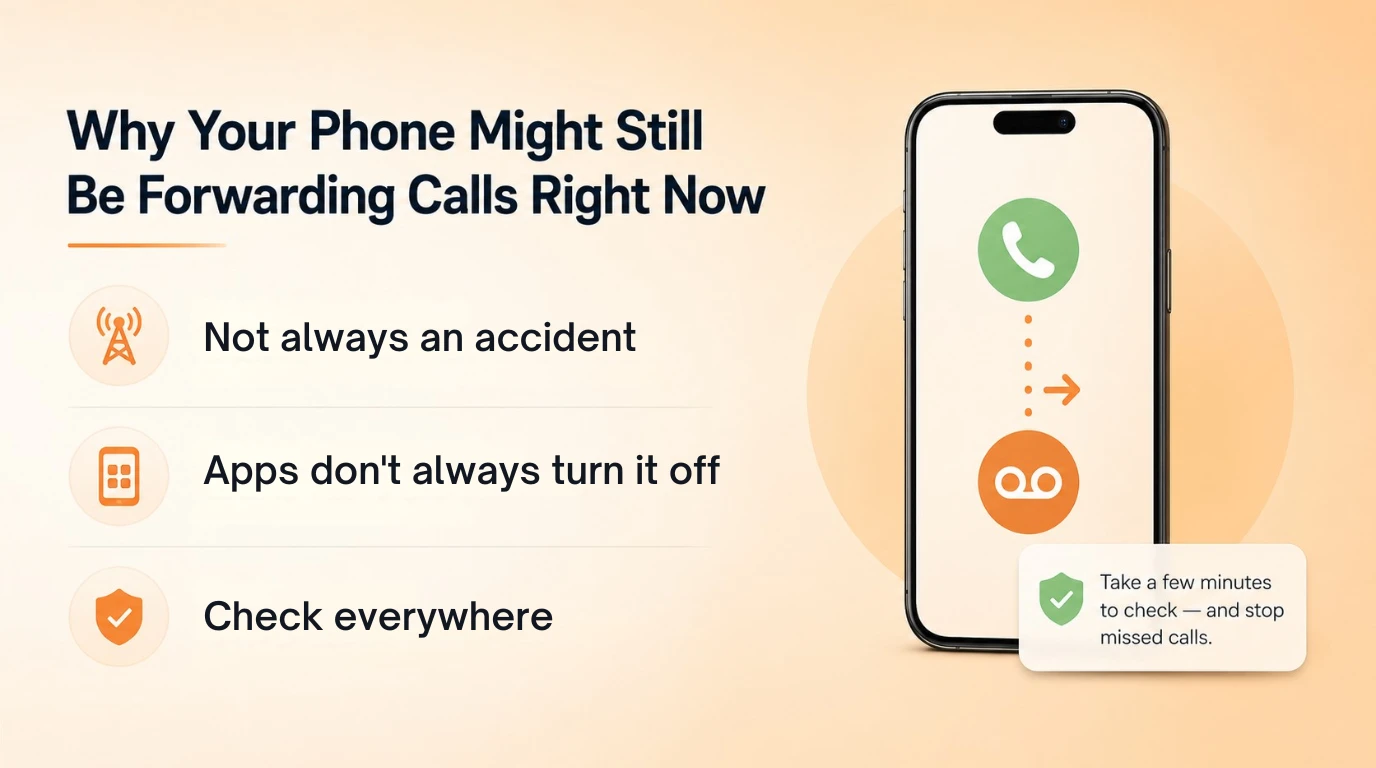
نادرًا ما يتم ترك تحويل المكالمات عن طريق الصدفة بالطريقة التي يفترضها الناس. عادة ما يكون التأثير الجانبي لشيء آخر. ربما قام فني شركة الاتصالات باستكشاف أخطاء المنطقة الميتة وإصلاحها بتمكين إعادة التوجيه المشروط إلى صندوق بريد صوتي ولم يقوم بإزالته مطلقًا. يمكن أن يصل الهاتف المستخدم أو المجدد مع بقاء قواعد إعادة التوجيه الخاصة بالمالك السابق نشطة في ملف تعريف بطاقة SIM، وغير مرئي حتى تبدأ المكالمات في الاختفاء. تطلب تطبيقات الاتصال الجماعي وبعض خدمات البريد الصوتي التابعة لجهات خارجية أيضًا أذونات إعادة التوجيه المشروطة أثناء الإعداد، وإذا قمت بإلغاء تثبيت التطبيق دون تعطيل إعداد شركة الاتصالات الأساسية، فستستمر عملية إعادة التوجيه في الخلفية.
ولهذا السبب يبدو أحيانًا أن إيقاف تشغيل إعادة توجيه المكالمات "لا يعمل" - لقد قمت بإيقاف تشغيل التطبيق، ولكن القاعدة من جانب شركة الاتصالات التي أنشأها التطبيق لا تزال سارية. الإصلاح هو نفسه بغض النظر عن السبب: يمكن تكوين البحث عن كل مكان لإعادة توجيهه لجهازك ومشغل شبكة الجوال المحددين، والتحقق من كل واحد بدلاً من افتراض أن مفتاح تبديل واحد يغطيه.
قم بإيقاف تشغيل تحويل المكالمات على iPhone
على جهاز iPhone المزود بخطة مشغل شبكة قياسية، يوجد الإعداد داخل إعدادات تطبيق الهاتف، وليس قائمة تطبيق الإعدادات الرئيسية في كل مشغل شبكة جوال - يختلف المسار الدقيق قليلاً حسب إصدار iOS.
- افتح الإعدادات.
- قم بالتمرير لأسفل وانقر فوق الهاتف.
- اضغط على تحويل المكالمات.
- إذا كان مفتاح التبديل أخضر، فانقر عليه مرة واحدة لتحويله إلى اللون الرمادي.
إذا كنت لا ترى خيار تحويل المكالمات على الإطلاق، فإن مشغل شبكة الجوال الخاص بك يديره على شبكته بدلاً من نظام التشغيل iOS، وهو أمر شائع مع شركات الدفع المسبق وبعض شركات الاتصالات الإقليمية. في هذه الحالة ستحتاج إلى طريقة رمز الناقل أدناه. لاحظ أنك تحتاج إلى إشارة نشطة لتغيير هذا الإعداد - إذا حاولت ذلك في وضع الطائرة أو في منطقة ميتة، فقد يبدو أن مفتاح التبديل قد تم تبديله ولكن لن يتم تحديثه فعليًا على جانب الشبكة.
قم بإيقاف تشغيل تحويل المكالمات على Android (حسب الشركة المصنعة)
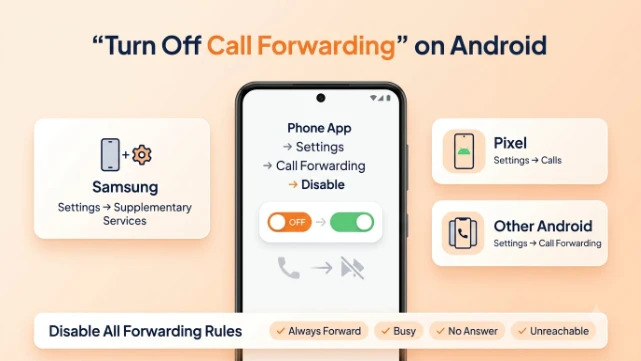
لا يحتوي نظام Android على قائمة عالمية واحدة لأن الشركات المصنعة تضع تطبيقات الاتصال الخاصة بها أعلى نظام التشغيل الأساسي. يكون الإعداد دائمًا تقريبًا داخل تطبيق الهاتف بدلاً من تطبيق إعدادات النظام، ولكن يختلف تسلسل النقر الدقيق.
- Samsung: افتح الهاتف، وانقر على قائمة النقاط الثلاث، واختر الإعدادات، والخدمات الإضافية، وإعادة توجيه المكالمات، ثم قم بإيقاف تشغيل كل نوع إعادة توجيه مدرج.
- Google Pixel (نظام Android الأساسي): افتح الهاتف، وانقر على قائمة النقاط الثلاث، واختر الإعدادات، والمكالمات، وإعادة توجيه المكالمات، ثم قم بتعطيل كل إدخال.
- ماركات Android الأخرى (OnePlus وMotorola وما إلى ذلك): المسار متطابق تقريبًا - تطبيق الهاتف، قائمة ثلاثية النقاط أو قائمة الهامبرغر، الإعدادات، ثم القسم الفرعي للمكالمات أو تحويل المكالمات.
الجزء الذي يفتقده الناس: تقسم معظم هواتف Android عملية إعادة التوجيه إلى أربعة شروط - للأمام دائمًا، وللأمام عند الانشغال، وللأمام عند عدم الرد، وللأمام عندما لا يمكن الوصول إليه. يؤدي إيقاف تشغيل "إعادة التوجيه دائمًا" إلى ترك الثلاثة الآخرين نشطين، لذلك لا يزال تتم إعادة توجيه المكالمات في ظل ظروف معينة. لإلغاء تنشيط إعادة توجيه المكالمات بشكل كامل على نظام Android، قم بإجراء التبديلات الأربعة بشكل فردي بدلاً من التوقف بعد التبديل الأول.
تعطيل تحويل المكالمات باستخدام رموز الناقل (لا حاجة إلى قائمة الإعدادات)
تعمل رموز شركة الاتصالات بشكل أساسي على أي هاتف، بما في ذلك الأجهزة القديمة والهواتف التي تكون القائمة التي تظهر على الشاشة مفقودة أو باللون الرمادي، لأنها تتحدث مباشرة إلى شبكة شركة الاتصالات بدلاً من برنامج الهاتف.
- رمز GSM العالمي (يعمل على AT&T وT-Mobile ومعظم الأجهزة الأخرى): اطلب ##002# ثم اضغط على اتصال. يؤدي هذا إلى مسح كل نوع من أنواع إعادة التوجيه مرة واحدة.
- فيريزون: اطلب *73 ثم اضغط على اتصال.
- AT&T (أنواع محددة): #21# يلغي إعادة التوجيه غير المشروط، #67# يلغي إعادة التوجيه المشغول، #61# يلغي إعادة التوجيه بدون إجابة، و #62# يلغي إعادة التوجيه غير القابل للوصول.
- T-Mobile: ##21# ثم اضغط على اتصال لإيقاف تحويل المكالمات بالكامل.
ستسمع عادةً نغمة تأكيد أو ترى رسالة على الشاشة تؤكد تنفيذ الطلب. إذا لم يحدث شيء بعد الاتصال، فقد يكون بناء جملة الرمز مختلفًا قليلاً بالنسبة لشركة الاتصالات الخاصة بك، ويستحق الأمر الاتصال سريعًا بخط الدعم الخاص بهم لتأكيد التسلسل الصحيح قبل افتراض تعطل الإعداد.
إيقاف تشغيل تحويل المكالمات من لوحة معلومات LetsDial أو VoIP
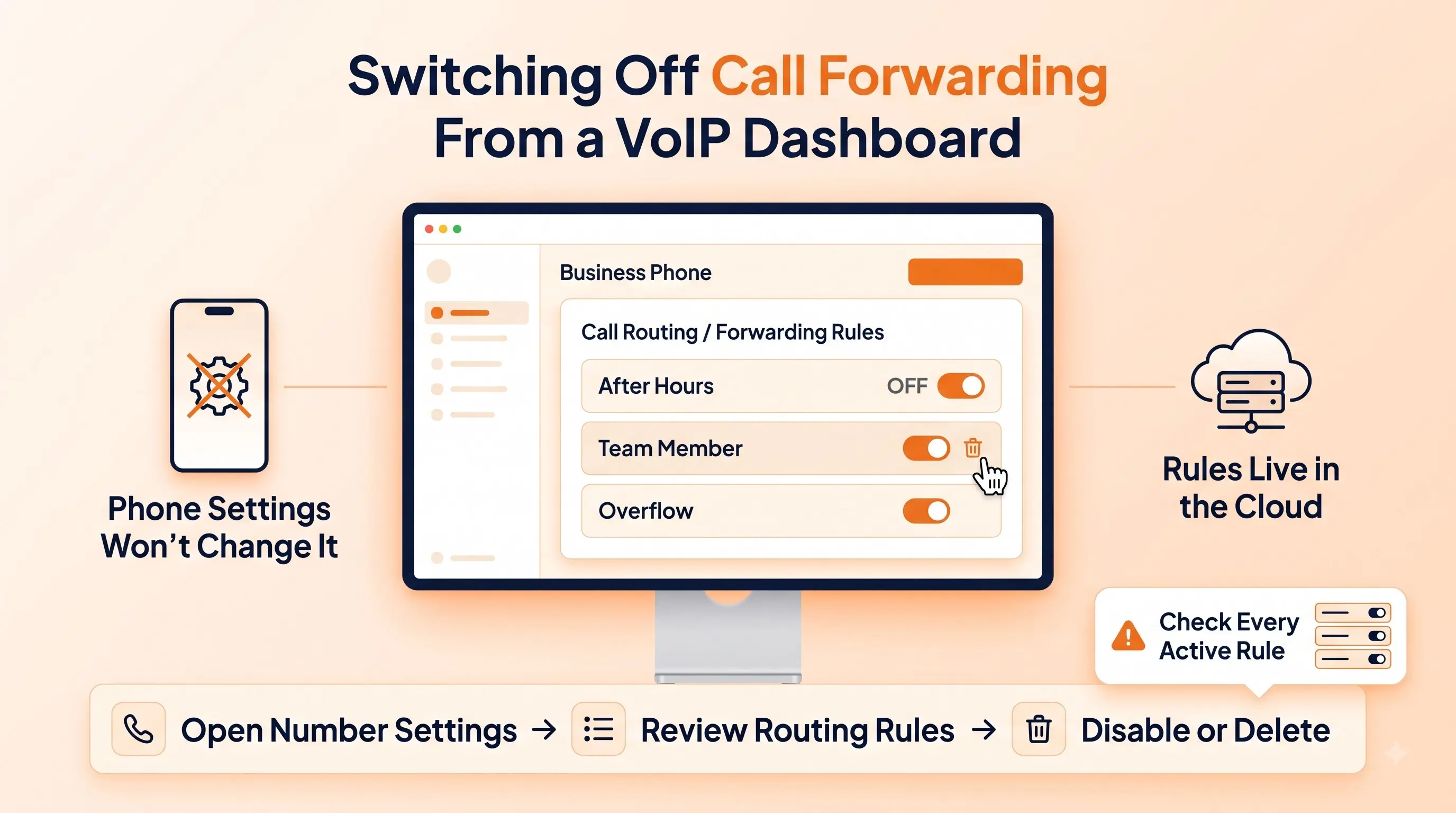
إذا كان رقمك يعمل عبر VoIP أو نظام هاتف افتراضي بدلاً من بطاقة SIM التقليدية، فلن تلمسه أي من الخطوات على مستوى الهاتف المذكورة أعلاه، نظرًا لأن إعادة التوجيه تم تكوينها من جانب الخادم، وليس على الجهاز. باستخدام LetsDial، توجد قواعد إعادة التوجيه داخل لوحة معلومات هاتف العمل، حيث يمكنك رؤية كل قاعدة توجيه نشطة مرفقة برقم بدلاً من تخمين إعداد الجهاز الذي سيتم تطبيقه. دليلنا ل تحويل المكالمات يغطي كيفية عمل قواعد التوجيه هذه في المقام الأول.
لتعطيل تحويل المكالمات على رقم LetsDial، قم بتسجيل الدخول إلى لوحة المعلومات، وافتح إعدادات الاتصال الخاصة بالرقم، وقم بإيقاف تشغيل قاعدة إعادة التوجيه أو احذفها بالكامل إذا كانت مرتبطة بوجهة مؤقتة مثل خط الهاتف المحمول خارج ساعات العمل. غالبًا ما تحتوي حسابات الأعمال على أكثر من قاعدة واحدة مجمعة — واحدة لما بعد ساعات العمل، وواحدة لعضو معين في الفريق، وواحدة للتجاوز — لذا تحقق من قائمة التوجيه الكاملة بدلاً من تبديل واحد. هذا هو المكان الذي ستتعرف فيه أيضًا على قواعد إعادة التوجيه التي قام موظف أو مقاول سابق بإعدادها ولم تتم إزالتها مطلقًا، وهو سبب شائع لاستمرار المكالمات في الهبوط في مكان غير متوقع على خطوط العمل المشتركة.
كيفية التأكد من أن تحويل المكالمات معطل بالفعل
لا يعد تبديل التبديل دليلاً على توقف إعادة التوجيه. الاختبار الوحيد الموثوق به هو الاختبار المباشر:
- اطلب من صديق أو هاتف آخر الاتصال برقمك مباشرة.
- دعها ترن بالكامل دون الرد.
- تأكد من إرسال المكالمة إلى البريد الصوتي الخاص بك، وليس إلى بريد شخص آخر، وأن هاتفك رن فعليًا طوال المدة.
يمكنك أيضًا طلب رمز التحقق من الحالة الخاص بشركة الاتصالات الخاصة بك - في معظم شركات اتصالات GSM، سيتم عرض *#21# متبوعًا بمكالمة ما إذا كانت عملية إعادة التوجيه غير المشروط نشطة حاليًا، وإذا كان الأمر كذلك، فسيتم عرض الرقم المشار إليه. يعد هذا أسرع من البحث مرة أخرى عبر القوائم ويعمل حتى إذا لم تكن متأكدًا من نوع إعادة التوجيه الذي تم تمكينه في الأصل.
لماذا لن يتم إيقاف تشغيل التبديل (استكشاف الأخطاء وإصلاحها)
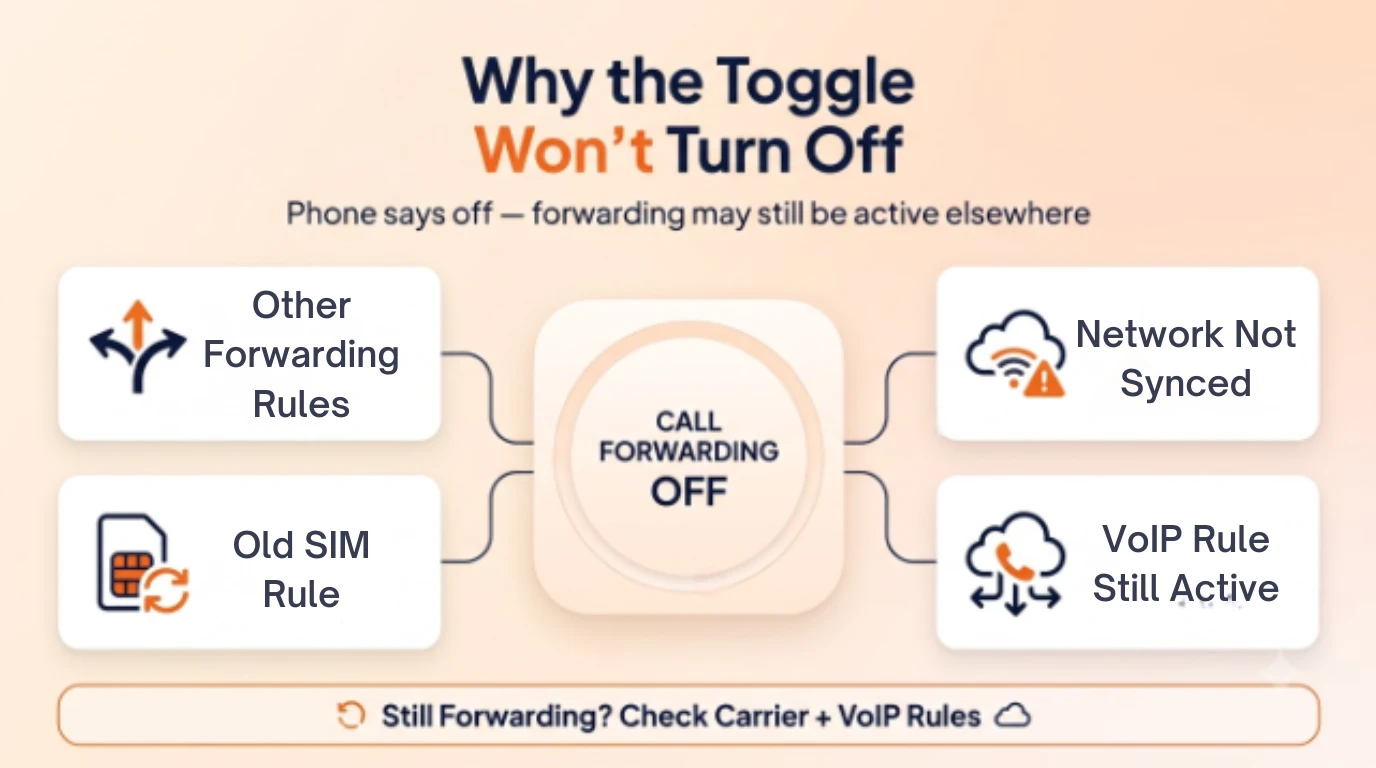
الشكوى الأكثر شيوعًا بعد محاولة إيقاف تشغيل تحويل المكالمات هي أن الإعداد يبدو معطلاً ولكن المكالمات لا تزال تعيد التوجيه. تشرح بعض الأسباب كل حالة تقريبًا:
- أنواع إعادة التوجيه المتعددة نشطة. لقد قمت بتعطيل شرط واحد (إعادة التوجيه دائمًا) ولكن إعادة التوجيه مشغول، أو لا إجابة، أو لا يمكن الوصول إليه لا تزال قيد التشغيل - قم بالرجوع عبر الشروط الأربعة.
- لم تتم مزامنة شبكة الناقل بعد. يؤدي التبديل في وضع الإشارة الضعيفة أو وضع الطائرة إلى تغيير العرض المحلي دون تحديث الشبكة. انتقل إلى منطقة الإشارة القوية وكرر الخطوة.
- يتم ترحيل تبديل بطاقة SIM أو نقل بطاقة eSIM عبر الإعدادات القديمة. أحيانًا تستمر قواعد إعادة التوجيه المرتبطة برقم الهاتف من خلال تغييرات الجهاز؛ استخدم طريقة رمز الناقل لفرض إعادة التعيين من جانب الشبكة.
- تتجاوز قاعدة لوحة معلومات VoIP إعدادات الجهاز. إذا كنت تستخدم رقم عمل، فقد يكون لدى شخص لديه حق الوصول الإداري قاعدة توجيه نشطة في النظام الأساسي، ولا علاقة لها بأي شيء موجود على الهاتف نفسه.
إذا لم يتم حل المشكلة من خلال أي من هذه الحلول، فإن الاتصال بمشغل شبكة الجوال مباشرةً ومطالبتهم بمسح إعادة التوجيه من جانبهم هو الحل الأسرع - حيث يمكنهم رؤية علامة جانب الشبكة وإعادة تعيينها حتى عندما تكون شاشة الهاتف غير متزامنة معها.
ماذا يحدث لمكالماتك لحظة إيقافها
بمجرد تعطيل إعادة التوجيه بشكل حقيقي، يتم رنين المكالمات الواردة مباشرة إلى جهازك باستخدام نغمة الرنين العادية ومدة الرنين، وتعود المكالمات التي لم يتم الرد عليها إلى أي بريد صوتي تم تكوينه أصلاً على هذا الخط - وليس البريد الصوتي للوجهة المعاد توجيهها. ليس هناك تأخير أو فترة انتقالية. يسري التغيير على المكالمة الواردة التالية. إذا كنت تقوم بإعادة التوجيه إلى خط احتياطي أو مساعد، فسيتوقف هذا الشخص عن تلقي مكالماتك على الفور، لذا من المفيد إعطاء أي شخص تنبيهًا قبل تعطيل إعادة توجيه المكالمات على رقم مشترك أو رقم تجاري.
تشغيل إعادة توجيه المكالمات مرة أخرى عندما تحتاج إليها
لا يؤدي تعطيل إعادة التوجيه إلى حذف الإعداد، بل يؤدي فقط إلى إيقاف تشغيله، لذا فإن إعادة التمكين لاحقًا تستخدم نفس القوائم أو الرموز في الاتجاه المعاكس. على iPhone، ارجع إلى الإعدادات > الهاتف > تحويل المكالمات وقم بتشغيله مرة أخرى، ثم أعد إدخال رقم الوجهة. على نظام Android، تتيح لك قائمة المكالمات أو تحويل المكالمات نفسها إعادة إضافة رقم إعادة توجيه. تم إقران رموز شركة الاتصالات بإصدارات "on" أيضًا - على سبيل المثال، *72 يقوم بتنشيط إعادة توجيه Verizon لمطابقة *73 الذي يلغيها.
بالنسبة لأي شخص يقوم بإعادة التوجيه بانتظام، مثل السفر للعمل أو تغطية خط أحد أعضاء الفريق مؤقتًا، فإن الرقم الافتراضي من خلال LetsDial يجعل هذا أقل عرضة للخطأ من التلاعب بإعدادات مشغل شبكة الجوال، حيث يمكن جدولة قواعد التوجيه وتعديلها ومراجعتها من لوحة تحكم واحدة بدلاً من دفنها في قائمة هاتف ستنساها لاحقًا. LetsDial التسعير يبدأ منخفضًا بدرجة كافية بحيث يكون تبديل خط يعتمد على الناقل بخط آخر مع التحكم على مستوى لوحة القيادة أمرًا يستحق كل هذا العناء لأي شخص سئم من متابعة إعدادات إعادة التوجيه عبر أجهزة متعددة.
خاتمة
يستغرق إيقاف تشغيل تحويل المكالمات أقل من دقيقتين بمجرد معرفة المكان الذي تبحث فيه - الإعدادات > الهاتف على iPhone، أو قائمة المكالمات في تطبيق الهاتف على Android، أو رمز شركة الاتصالات على أي جهاز، أو قواعد التوجيه داخل لوحة معلومات VoIP لرقم العمل. تحقق من جميع الشروط الأربعة، وقم بتأكيد التغيير من خلال مكالمة اختبار حقيقية، وستتجنب السبب الأكثر شيوعًا الذي يجعل الناس يعتقدون أن التبديل "لا يعمل".
للحصول على لقطات شاشة خطوة بخطوة مباشرة من المصدر، توجد تعليمات Apple الخاصة بها دليل مستخدم iPhone الرسمي تغطية كلاً من إصدارات GSM وCDMA.
الأسئلة المتداولة
كتب بواسطة اريان خان · 7 أغسطس 2026
الرد على المؤلف